
How to Check Your CAO Application Status
The Central Applications Office (CAO) is used by several higher education institution in South Africa (primarily in KwaZulu-Natal or some TVET colleges) to handle applications.
Step by Step Process
Visit the Official CAO Website
- Go to their official Central Applications Office website in South Africa.
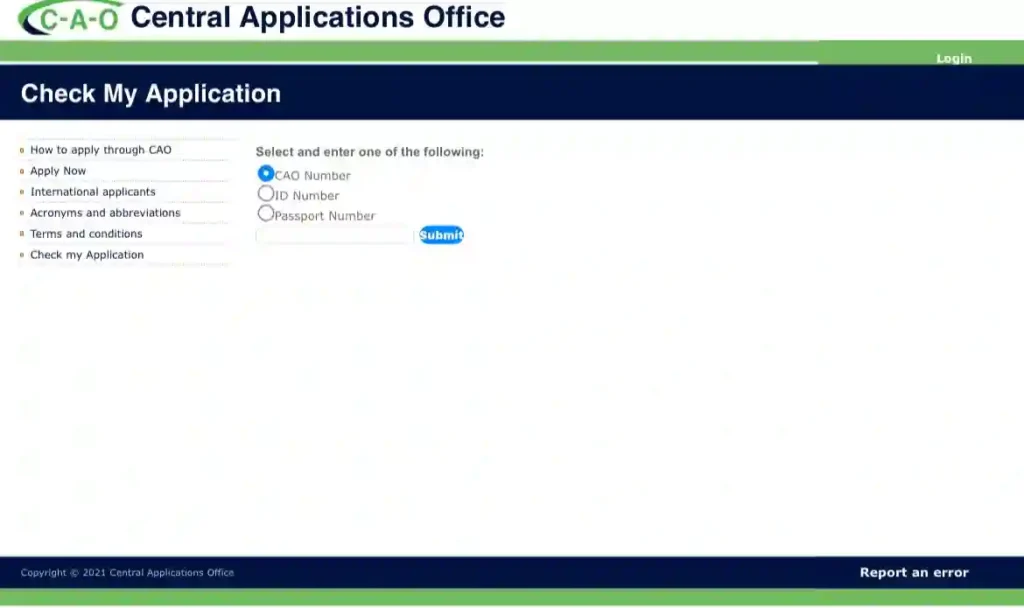
Locate the “Check My Application” Section
On the CAO homepage, you look for a prominent link or button labeled:
- “Already applied? Use ‘Check my Application’ to follow the progress of your application. “
This will take to another page where you need ro put some details like your Id or Passport then you login it .

Enter Your Details
You will be prompted to enter one of the following unique identifiers:
- Your CAO Application Number (This is the most common and reliable method).
- Your South African ID Number.
- Your Passport Number (for international applicants).
Review Your Status
Once you submit your all details, the system will display your application status. The status will indicate where your application is in the process, which could include:
| Status Code/Description | Meaning |
| Application Received (AR) | CAO has successfully captured your application and supporting documents. |
| Waiting for Decision (WFAD) | Your application is currently being evaluated by the institution(s) you applied to. |
| Conditionally Accepted (G) | You meet the academic requirements based on your current (e.g., Grade 11 or/mid-year Grade 12) results. Final acceptance depends on your final Grade 12 results. |
| Not Accepted (X or K) | The institution has decided not to offer you a place usually due to insufficient marks or prerequisite subjects. |
| Waiting List (W) | You meet minimum entry requirements but there are limited spaces so you are on a waiting list for a final decision. |
Contact for Assistance
If you have trouble logging in or understanding your status, you can contact the CAO directly:
- Telephone: +27 31 268 4444 or Sharecall 086 086 0 CAO (226)
- Email: [email protected]
2 Comments
Comments are closed.